URP Render Features
Unity Playworks Plugin now supports URP Render Features!
Render Features are a powerful extension mechanism in Unity's Universal Render Pipeline (URP) that allow you to inject custom rendering passes into the rendering pipeline. With Render Features, you can customize how objects are rendered, add post-processing effects, and create unique visual styles for your playables.
On this page you can find out what Render Features are, how they work, and which features Unity Playworks Plugin currently supports.
What are URP Render Features?
URP Render Features are modular components that extend the URP rendering pipeline. They allow you to:
- Override rendering settings for specific objects or layers
- Add custom rendering passes at different stages of the frame
- Control rendering order and appearance of objects
- Implement advanced visual effects without modifying shaders
Render Features are added to the URP Renderer Asset and are executed as part of the rendering pipeline. Each Render Feature can be enabled or disabled, giving you fine-grained control over your rendering setup.
How Render Features Work
The rendering process with Render Features follows these steps:
- Configuration: Render Features are added to the URP Renderer Asset
- Execution Order: Each Render Feature has an injection point (e.g.,
AfterRenderingOpaques,BeforeRenderingTransparents) - Filtering: Render Features can filter which objects they affect using Layer Masks and Material filters
- Rendering: The Render Feature executes its custom rendering pass according to its settings
Adding Render Features in Unity
To add a Render Feature to your project:
- Locate your Universal Renderer Data asset (typically in your project's Settings folder)
- In the Inspector, scroll to the
Renderer Featuressection - Click Add Renderer Feature and select the desired feature
- Configure the feature's settings
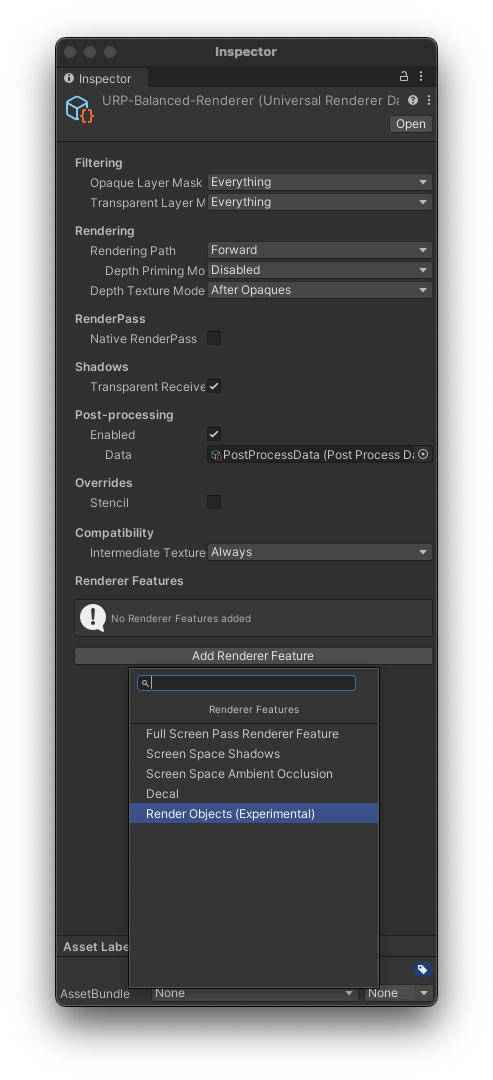
Supported Render Features
Unity Playworks Plugin currently supports the following URP Render Features:
| Feature name | Supported? | Notes |
|---|---|---|
| Render Objects | Yes | Full support with some limitations Learn more |
| Decal | No | Not supported in current version |
| Screen Space Shadows | No | Realtime shadow rendering is supported Learn more |
| Screen Space Ambient Occlusion (SSAO) | No | Not supported in current version |
| Full Screen Pass Renderer | No | Not supported in current version |
Performance Considerations
When using Render Features in your playables, keep in mind:
- Each Render Feature adds a rendering pass, which can impact performance
- Use Layer Masks to limit which objects are affected by Render Features
- Avoid using multiple Render Features that affect the same objects unless necessary
- Test your playable on various devices to ensure acceptable performance
For more tips on optimizing your playables, check out our Optimization Guide.
Common Use Cases
Render Features are commonly used for:
- Outline Effects: Rendering object outlines for selected or highlighted objects
- Custom Depth Rendering: Creating depth-based effects like fog or distance-based color grading
- Layer-Specific Rendering: Applying different rendering settings to UI vs. gameplay objects
- Stencil-Based Effects: Creating masks and composite effects
- Material Override: Temporarily changing how specific objects are rendered
Known Issues and Limitations
Current limitations when using Render Features with Unity Playworks Plugin:
- Not all render events are supported. Currently, we fully support the following events:
BeforeRenderingOpaquesAfterRenderingOpaquesBeforeRenderingSkyboxAfterRenderingSkyboxBeforeRenderingTransparentsAfterRenderingTransparents
- Render Objects
- does not fully support override index pass of material/shader
For troubleshooting common issues with URP Render Features, check our Common Issues section.
Learn More
For detailed information on specific Render Features:
- Render Objects Feature - Learn how to use the Render Objects feature to customize object rendering
For more information about URP support in general, see our Universal Render Pipeline page.